
How to Create a FivePD Server (Legacy Setup Guide)
Set up a FiveM test server for legacy FivePD, choose the package's database backend, configure JSON safely and verify startup before opening to players.
Scope: this is a legacy FivePD setup workflow, not a promise that an old binary runs on every current FXServer build. The source review on 22 September 2026 checked Cfx.re documentation and a pinned third-party legacy configuration snapshot. It did not verify a current official FivePD release or run an in-game installation. Read the release and source notes before selecting a package.
To play on someone else’s server, use the player guide instead. The steps below are for server owners working on a separate test instance.
What is FivePD?
FivePD adds police-focused roleplay to FiveM, including AI scenarios and cooperative patrols. It is a separate project from LSPDFR, not that mod’s official multiplayer port. Departments, available scenarios and additional resources depend on the installation. See What is FivePD? for the distinction between the mod, the server and optional add-ons.
System requirements
There is no benchmark-backed, universal FivePD hardware minimum established by this review. Size the server for its player count, streamed assets, scripts and database workload, and measure a representative patrol before buying or upgrading hardware.
| Check | What to establish before installation |
|---|---|
| Operating system | FXServer support and compatibility of the selected FivePD binaries, native libraries and database backend |
| CPU and memory | Headroom under representative load, not a guaranteed player count inferred from core count |
| Storage | Space for resources, player downloads, logs and separate recoverable backups |
| Network | Reachability of the configured game port; keep management and database access restricted |
| Dependencies | The requirements of the specific FivePD package and each add-on |
A host advertising FiveM support does not certify every legacy FivePD package. In particular, do not infer Linux compatibility for a bundled SQLite native library merely because FXServer supports Linux. Treat older sizing suggestions in the hardware guide as planning material, not verified minimums.

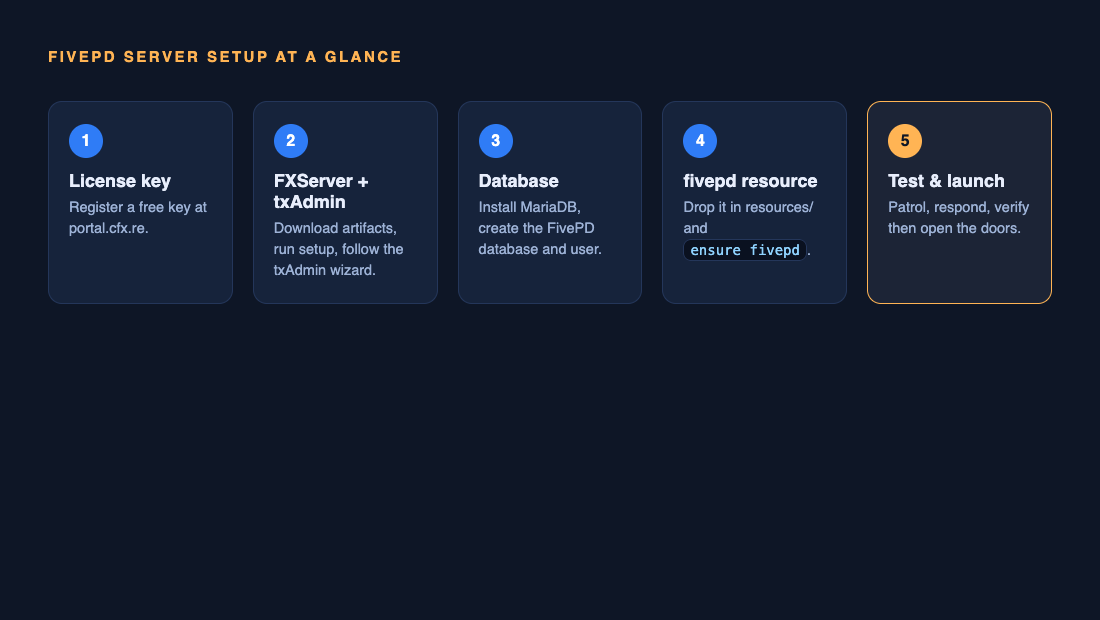
Step 1: Install FXServer with txAdmin
Begin with a working vanilla FiveM server. Follow the Cfx.re txAdmin setup guide for the current platform workflow and obtain your server license key through the Cfx.re Portal. Use Cfx.re’s server artifacts, selecting the appropriate operating-system build.
Complete the txAdmin setup, configure a unique administrator password and test a vanilla connection before adding FivePD. For a server on the same PC, the FiveM client F8 console can connect to the configured local game endpoint, for example:
connect 127.0.0.1:30120The address and port are examples, not universal settings. Do not expose the management interface or database to the internet just to make the game reachable. Keep your license key and administrator credentials out of screenshots and public repositories.
Step 2: Choose the package’s database backend
Do not assume that MySQL or MariaDB is mandatory. The inspected legacy root config.json selects "db": "sqlite" and also contains a database object. That is evidence about that snapshot, not a database contract for every FivePD version.
For a package using SQLite, establish the actual database-file location, directory permissions, native-library compatibility and a consistent backup method. Stop the test server before taking a simple file-copy backup; do not copy an actively changing database and assume it is recoverable.
For a package whose own instructions require a MySQL-compatible backend, create a separate database and a dedicated least-privilege account. Configure the host, port and credentials in the location documented by that package. Do not reuse a database administrator account or a blank password from an example configuration.
Before any SQL import, read the file. Schema installers can include destructive statements such as DROP TABLE. A fresh-install script is not automatically a safe upgrade script. Back up and test restoration first; never import an unknown initialization file into production to see whether it fixes an error.
Step 3: Install the FivePD resource
Use the download-information page to distinguish legacy mirrors from external project links. A ZIP filename is not proof of release authenticity, licensing permission or compatibility. Do not mix binaries from several packages or install an unexplained third-party hotfix as a routine setup step.
Keep the package’s file structure intact. For a resource installed as resources/fivepd, add the following line to the appropriate server configuration after any dependencies actually required by that package:
ensure fivepdAccording to the Cfx.re server command reference, ensure starts a stopped resource or restarts a running one when the command is executed. It is not an automatic crash-recovery watchdog. refresh rescans resource manifests; it does not repair a broken resource or update FivePD.
Check startup output in the server console. Resolve dependency, assembly-loading and database errors before adding vehicles or callout packs. Test restart operations away from active patrols.
Step 4: Configure the matching files
In the inspected legacy layout, the main file is fivepd/config.json, while additional JSON files live under fivepd/config/. This is not a generic config.lua installation.
The following is an excerpt showing observed keys, not a complete replacement configuration:
{
  "db": "sqlite",
  "stationBlips": true,
  "dutyNotification": true
}
Edit the existing file instead of pasting the excerpt over it. Preserve unrelated settings and validate JSON syntax. Review the package’s administrator code and database credentials before launch. Do not publish bot tokens or enable an integration without understanding the version’s requirements.
For callouts, inspect config/callouts.json and the callout author’s instructions. The inspected snapshot contains timing and probability settings, not a namespace-registration list. See adding custom callouts.
Add vehicles or multiple packs only after the base installation works. Those legacy customization guides still require their own compatibility checks.
Step 5: Test before you open
Record the FivePD package source and version, FXServer build, operating system, database backend and add-on versions. A useful acceptance run covers:
- Resource startup without unresolved server or client errors.
- Joining, using the server’s configured duty controls and completing a callout.
- Using the police computer features available in that package.
- Reconnecting and restarting to check the data that should persist.
- Repeating the patrol with another player and checking shared interactions.
- Restoring the previous configuration and database on the test instance.
Keep a copy of these results. This article’s source-review date is not a substitute for your server’s acceptance test.

After launch: helping players get started
Publish the required client setup, connection instructions, rules and a reliable contact route. Make the first patrol work before advertising additional features. Community scheduling and onboarding suggestions are in What makes a great FivePD server?; they are editorial advice, not a promise of player growth.
Common issues and fixes
| Symptom | First check |
|---|---|
| Vanilla FiveM connection fails | Fix the license, configured endpoint and network access before diagnosing FivePD |
| FivePD fails to load | Capture the first error; check the resource name, package layout and required assemblies |
| Database connection or persistence fails | Confirm the selected backend, permissions and actual configuration; do not blindly reimport SQL |
| One callout fails | Test that pack alone against the previously working baseline |
| All callouts fail | Check core startup, duty state and the package’s callout settings |
| Performance degrades | Separate client rendering/resource measurements from server profiling; reproduce under a recorded workload |
See the callout troubleshooting workflow. Client measurements alone do not establish a server-side CPU bottleneck.
FAQ
Do I need a dedicated server to run FivePD?
You can prepare a local test instance, subject to the selected package’s requirements. Public hosting adds availability, security, networking and backup considerations. Do not assume a successful solo test predicts public-server capacity.
How much does a FivePD server cost?
Costs depend on hardware or hosting, storage, backup, network usage and optional paid assets. This guide does not provide a current hosting-price quote. Compare the full configuration rather than a headline slot price.
Can players join without the FivePD mod installed?
Players normally join through FiveM and receive the server’s configured resources. They do not install the server ZIP into their GTA V folder. Follow the community’s client requirements and distinguish server resources from optional client-side visual mods.
Do I need OneSync for FivePD?
Check the package’s documented synchronization requirements and test its callouts on the chosen FXServer configuration. Cfx.re documents OneSync modes in the server command reference; this review does not establish a universally compatible setting for all legacy FivePD binaries.
Is hosting a FivePD server free?
A free legacy mod download does not make hosting, hardware or third-party assets free. Nor does it establish an open-source license. Check the terms and costs of each component.
Before changing a working installation, use the same backup-and-restore discipline described above. The older update guide is supplementary material and has not received the source review applied to this page.